
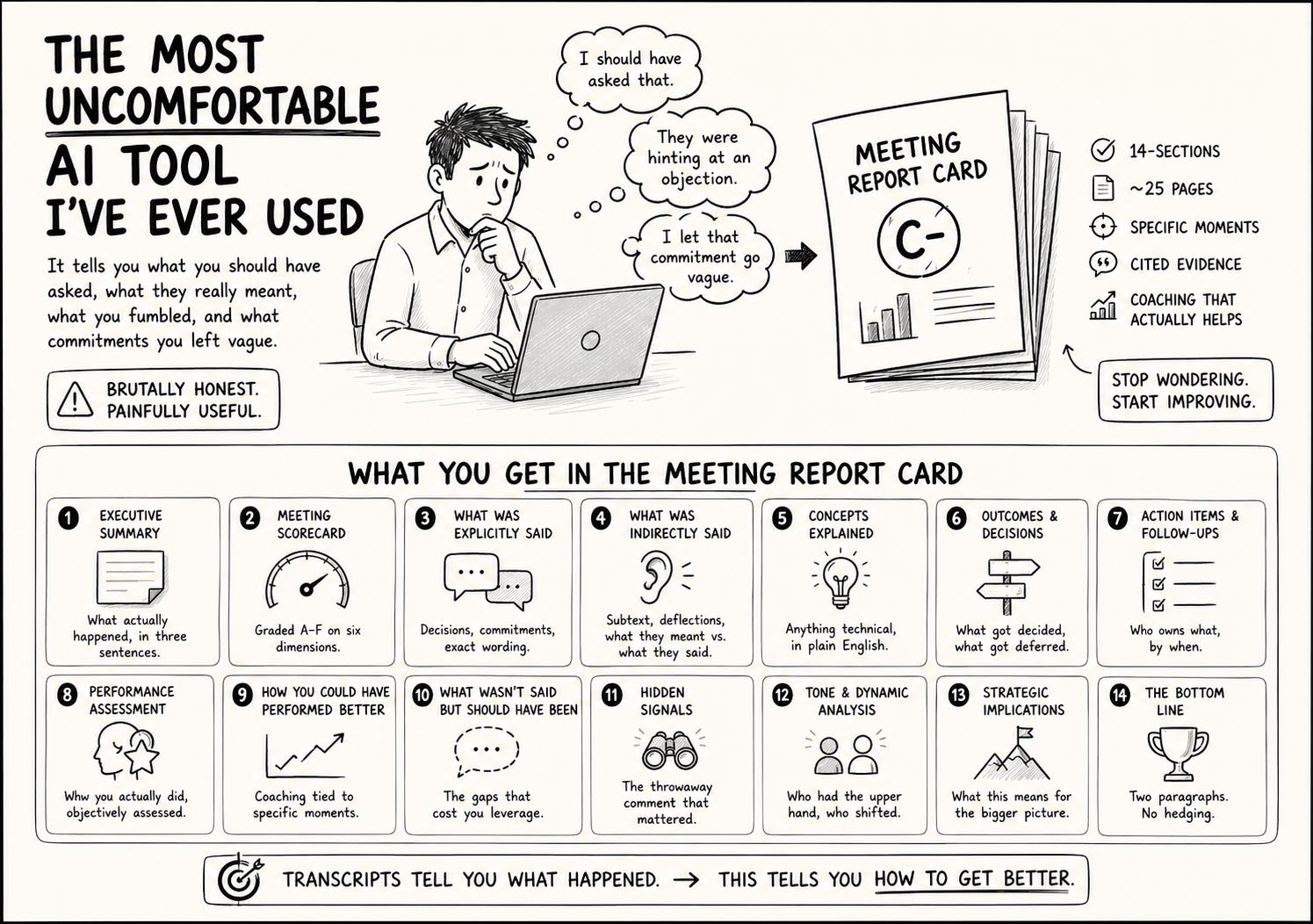
It tells you which question you should have asked and didn’t. Which objection the buyer hinted at but you let slide. Which moment you fumbled. Which commitment you let go vague when you should have pinned it down.
The problem with meeting transcripts
If you’re using Granola, Fathom, Fireflies, Gong, Otter — any of them — you already get a transcript. Maybe a summary. Maybe some action items.
That’s useful. It saves you taking notes.
It is not useful for getting better.
A transcript tells you what happened. It does not tell you whether what happened was good.
A summary tells you the topics. It does not tell you which topic you should have spent more time on.
Action items list what got assigned. They do not list what should have been assigned but wasn’t.
If you want to actually improve as a salesperson — or coach a sales team that’s improving — you need a layer above the transcript. You need someone who watched the meeting with adult eyes and is willing to tell you the truth.
This is that layer.
What the Meeting Report Card does
You paste in a Granola link. Or you upload a transcript. Or you paste the raw text into Claude.
You get back a 14-section report. About 25 pages. Designed to be printed and read.
The sections cover:
Executive summary — what actually happened, in three sentences
Meeting scorecard — graded A to F on six dimensions
What was explicitly said — decisions, commitments, exact wording
What was indirectly said — subtext, deflections, what they meant vs what they said
Concepts explained — anything technical that came up, in plain English
Outcomes and decisions — what got decided, what got deferred
Action items and follow-ups — who owns what, by when
Performance assessment — how you actually did
How you could have performed better — coaching tied to specific moments
What wasn’t said but should have been — the gaps
Hidden signals — the throwaway comment that mattered
Tone and dynamic analysis — who had the upper hand, who shifted
Strategic implications — what this means for the bigger picture
The bottom line — two paragraphs, no hedging
Every claim cites the transcript. Every grade comes with a reason. Every coaching note points to a specific moment in the call.
The thing was built to be brutally honest. It is.
The section that changes how you sell
Section 4 — “What was indirectly said.”
Most meetings, the buyer doesn’t say no. They say “let me think about it.” They say “send me some information.” They say “the timing’s a bit tricky right now.”
You hear those phrases and your brain registers “okay, soft yes, follow up next week.”
The report card hears those phrases and tells you exactly what was being signalled. It quotes the exact words. It tells you what they almost certainly meant. It tells you the moment in the call where they shifted from interested to polite.
The first time I read this section about one of my own calls, I realised I’d been reading “warm follow-up” on deals that were dead in the room.
Half my pipeline cleaned itself out the next week.
How to install it
Same setup as the Contact Deep Dive skill — if you’ve already installed that one, you already have everything you need. Skip to “How to run it.”
If you haven’t, here’s the full setup:
Step 1. Turn on Code Execution
Open Claude. Click your name (bottom left) → Settings → Capabilities. Toggle on Code Execution and File Creation.
The skill won’t work without this. Claude needs to actually produce the HTML report file, not just text.
Step 2. Install the skill
Go to Customize → Skills. Click “Create a new skill.” Paste the skill file (at the bottom of this post) into the editor. Save.
Step 3. (Optional) Make Granola easier
You don’t need to connect Granola for this skill to work. The skill takes Granola share links via web fetch. To use that, just open the meeting in Granola, click Share, copy the share link, paste it into Claude.
If you’d rather not share-link every meeting, upload the transcript file directly or paste the raw text. Both work.
How to run it
Three ways depending on where your transcript lives.
If you use Granola — paste the share link into Claude:
analyse this meeting https://app.granola.so/shared/abc123
If you have a transcript file (.txt, .vtt, .srt, .md) — drag it into Claude and say:
meeting report card on the attached
If you have the raw text — paste it in and say:
score this meeting
Any of those will trigger the skill. Wait about a minute. You’ll get a single HTML file. Open it in your browser. Print it if you want.
Make it sharper with context
The report card is good with just the transcript. It gets sharper if you give it context.
If you’re running this in a Claude project, drop these into the project folder before you run the skill:
The meeting agenda or brief
A one-pager on the company you met with
What you wanted out of the meeting
Notes from previous meetings with this person or company
The skill reads everything in the project folder before grading. The difference between “no context” and “two background docs” is the difference between a report that says “you fumbled the pricing question” and one that says “you fumbled the pricing question — and given your goal was to anchor at the high tier, this was the worst moment to soft-pedal.”
You don’t need this. But it’s a step up if you’ve got 30 seconds.
How to actually use the output
Don’t read the whole thing the day of the meeting. You’re too close to it. You’ll be defensive.
Read it the morning after. With coffee. Out loud if you can.
Three things to do every time:
1. Pull one coaching note into your prep doc for the next call with this prospect. Just one. “Last call, when they said X, I responded with Y. Next time, try Z.”
2. Update your CRM with the hidden signals. If the report flagged a deflection or a tell, write it down. These become the things you raise next call.
3. If the meeting got a C or below — and you’ll get a lot of those at first — schedule a 10-minute call with whoever runs your sales. Not to be defensive. To get specific.
The report card replaces the generic “how’d it go?” debrief with something specific enough to actually act on.
What this isn’t
It’s not a replacement for a sales coach. A good coach asks questions the report card never will.
It’s not magic. It analyses what’s in the transcript. If your transcript is garbage, the report is garbage. Get a half-decent recorder. A meeting at least 45 mins long.
It’s not for every meeting. You don’t need a 14-section report on a 12-minute standup. Use it on the calls that matter — discovery, demos, negotiations, board meetings.
It’s for the meetings where you’d genuinely want to know what you missed.
The uncomfortable truth
The first three or four times you run this, you’ll get grades you don’t like.
You’ll see moments you fumbled that you didn’t realise you’d fumbled. You’ll see questions you should have asked. You’ll see leverage you left on the table.
This is the point.
A note on recording
Different countries have different rules about recording meetings. In Victoria, where I’m based, you can record a meeting with one-party consent — which means as long as you’re a party to it, you’re allowed to record.
The reason I use Granola specifically is that it transcribes rather than records. In some jurisdictions that’s an easier path. Check your local laws or check with your legal team if you’re unsure.
The ethical default — and it costs you nothing — is to tell the room. “I’m using a transcription tool, it’ll be in my notes after the call.” Nobody has ever objected.
Get the skill
The generic skill file is below.
Copy it. Paste it into Claude as a new skill (Customize → Skills → Create a new skill).
Then run it on your worst meeting from this week. Not your best.
The worst one is the one that teaches you.
Reply to this post and tell me what grade you got. I read every reply.
The skill file
Copy everything in the block below into Claude as a new skill.
markdown
---
name: meeting-report-card
description: "Generate a comprehensive, brutally honest meeting intelligence report from a meeting transcript. Use this skill whenever the user provides a transcript, uploads a transcript file (.txt, .md, .vtt, .srt), pastes a meeting share link (e.g. app.granola.so/shared/..., otter.ai, fireflies.ai, fathom.video), or asks for analysis of a specific meeting. Trigger phrases: \"analyse this meeting\", \"meeting report card\", \"score this meeting\", \"debrief this call\", \"meeting report on\", \"report card on the attached\". ALWAYS trigger when a transcript or meeting share link is present alongside any of these intents. Required: an actual transcript, file, or meeting URL must be present. Without one, ask the user to provide it before running."
---

# Meeting Report Card

Generate a meeting intelligence report that extracts maximum value from any meeting transcript — what was said, what wasn't said, what the user should do about it.

**Prerequisites:** Code Execution and File Creation must be enabled (required to produce the HTML output).

**Time budget:** Aim for 60–120 seconds total for a typical transcript.

---

## Step 1: Locate and Ingest the Transcript

The user will provide one of the following:

1. **A meeting share link** (Granola, Otter, Fireflies, Fathom). Use `web_fetch` on the URL to retrieve the transcript. Do NOT ask the user to paste it manually first — go fetch it yourself. If `web_fetch` returns a login page, expired link, or no transcript content, then ask the user to either make the link public, upload the transcript file, or paste the raw text.

2. **An uploaded file** (`.txt`, `.md`, `.vtt`, `.srt`, or similar). Read it directly from `/mnt/user-data/uploads/`. For `.vtt` or `.srt`, strip the timestamp/index lines if they're not useful.

3. **Pasted raw text.** Use what's in the message.

4. **A URL to a meeting tool you don't recognise.** Try `web_fetch` first. If it fails, ask the user to paste or upload.

If none of these is present, ask the user to provide a transcript before running the rest of the skill.

### Project context (optional but valuable)

If the user is working inside a Claude project, read all files in the project folder before starting analysis. Useful context includes:

- An agenda or meeting brief
- Background docs on the people or company involved
- Stated goals or desired outcomes for the meeting
- Previous meeting notes or relationship history
- Any relevant business context

Context is critical for assessing whether objectives were achieved, and for reading subtext correctly. If the project has context, use it. If not, work from the transcript alone.

---

## Step 2: Identify the User's Perspective

The "user" in the report is the person whose performance is being graded. By default, assume this is the person running the skill, and that they were a participant in the meeting (typically the host or the salesperson).

If the transcript or project context makes it clear the user is someone else (e.g. they say "analyse my rep Sarah's call" or the project context names a specific participant), grade that person's performance instead.

If it's genuinely ambiguous who to grade, default to the most senior or most active participant on the "selling" or "presenting" side of the conversation.

---

## Step 3: Read the Full Transcript Carefully

- Read it through at least twice
- Read all project context documents
- Identify all participants by name and role
- Map the chronological flow of the conversation
- Note timestamps if available
- Flag any moments where tone or energy clearly shifts

---

## Step 4: Build the Report

Generate a single self-contained HTML file with the 14 sections below. Every section should be substantive — no filler, no generic observations. If a section genuinely has no signal in this transcript, say so honestly in one sentence rather than padding.

### Key Analytical Principles

**Be brutally honest.** The user wants unvarnished truth, not diplomatic fluff. If they fumbled, say so directly. If the other party was evasive, call it out. The value of this report is in its honesty.

**Read between the lines.** Half the value of a meeting is in what's NOT said. Pay attention to:
- Questions that were deflected or answered indirectly
- Topics that were conspicuously avoided
- Changes in tone, energy, or engagement
- When someone says "yes" but their language signals hesitation
- Power dynamics and who controlled the conversation flow
- Commitments that were vague vs specific
- When someone "agreed" without actually committing to anything

**Assume the user is smart but busy.** They were IN the meeting — they heard the words. What they need is the stuff they might have missed because they were focused on performing.

**Ground everything in evidence.** Quote the transcript directly when making claims. Don't assert "they seemed hesitant" without pointing to the specific language.

**Think about power and leverage.** Who had it? How did it shift? What created or destroyed leverage? What leverage was left on the table?

---

## The 14 Report Sections

### 1. Executive Summary (3–5 sentences)
The headline. What happened, what the outcome was, and the single most important thing the user needs to know. Sharp briefing, not a wishy-washy recap.

### 2. Meeting Scorecard
A quick-glance grading table:
- **Outcome Achievement**: Did the meeting achieve what it was supposed to? (A–F)
- **Preparation & Positioning**: How well was the user set up going in? (A–F)
- **Communication Clarity**: How clearly did the user convey their points? (A–F)
- **Listening & Adaptability**: Did the user pick up on cues and adjust? (A–F)
- **Relationship Building**: Did the meeting strengthen or weaken the relationship? (A–F)
- **Strategic Positioning**: Did the user improve their position for future interactions? (A–F)
- **Overall Grade**: Weighted composite (A–F)

Each grade gets a one-line justification with a transcript reference.

### 3. What Was Explicitly Said — Key Statements & Commitments
A structured breakdown of the most important things said, organised by speaker:
- Decisions made
- Commitments given (with exact wording — vague commitments get flagged)
- Key information shared
- Positions stated
- Numbers, dates, specifics

Quote directly. Flag any commitments that were ambiguous or had escape clauses built in.

### 4. What Was Indirectly Said — Subtext & Implications
The high-value section. Analyse the subtext:
- What did people imply without stating directly?
- What was communicated through tone, word choice, or framing?
- Where did someone say one thing but mean another?
- What signals were sent through what was NOT addressed?
- What can be inferred about the other party's true position, priorities, or constraints?

For each observation, provide the evidence (actual words used) and your interpretation.

### 5. Concepts & Context Explained
Identify any technical terms, industry jargon, references, frameworks, regulations, or concepts the user might benefit from understanding more deeply. For each:
- What it is (plain English)
- Why it matters in this context
- How it connects to the user's interests or position
- Any nuance to be aware of

If nothing technical came up, say so in one sentence and move on.

### 6. Outcomes & Decisions
A clean, definitive list:
- **Decisions Made**: What was actually decided
- **Decisions Deferred**: What was kicked down the road, and why
- **Open Questions**: What remains unresolved
- **Implicit Agreements**: Things that seem agreed but were never explicitly confirmed

For each, note who owns it and whether there's a clear next step.

### 7. Action Items & Follow-Ups
Two distinct lists:

**Immediate (next 48 hours):** What | Who | By When | Priority | Notes

**Follow-Up (longer-term):** What | Who | Timeline | Dependencies | Notes

Flag any action items mentioned but not assigned — these will fall through the cracks.

### 8. Performance Assessment — How You Did
An honest, specific evaluation of the user's performance:
- **Strengths**: What they did well, with specific examples
- **Missed Opportunities**: Moments where they could have pushed harder, asked a better question, made a stronger point
- **Tactical Errors**: Anything they said or did that weakened their position
- **Tone Signals**: Filler words, hedging language, confidence level

Rate their overall performance and explain why.

### 9. How You Could Have Performed Better — Coaching Notes
Specific, actionable coaching tied to actual moments in THIS meeting:
- "When [person] said X, you responded with Y. A stronger response would have been Z, because..."
- "You missed an opportunity at [moment] to ask about..."
- "Your framing of [topic] could have been more effective if..."
- "Next time you're in this situation, consider..."

Frame these as coaching from someone who's done 10,000 of these meetings.

### 10. What Wasn't Said But Should Have Been
Critical gaps in the conversation:
- Topics that should have been raised
- Questions that should have been asked
- Objections that should have been voiced
- Boundaries that should have been set
- Context that should have been shared

For each, explain why it matters and what the risk is of leaving it unaddressed.

### 11. Hidden Signals — What You Might Have Missed
Things said that carry significance the user may not have caught in real-time:
- Throwaway comments that actually signal something important
- Subtle shifts in position
- Trial balloons or testing language
- Emotional reactions quickly masked
- Status signals or power moves
- References to external pressures or constraints mentioned briefly

For each, explain the signal and what it likely means.

### 12. Tone & Dynamic Analysis
A read on the meeting dynamics:
- **Overall Tone**: Collaborative? Adversarial? Cautious? Enthusiastic?
- **Power Dynamic**: Who had the upper hand? How did it shift?
- **Engagement Levels**: Who was checked in vs checked out? When did energy shift?
- **Relationship Temperature**: Warmer or cooler than expected? Friction points?
- **Pace & Control**: Who controlled the flow? Was the meeting well-structured?

### 13. Strategic Implications
Zoom out. What does this meeting mean for the bigger picture?
- How does this affect the user's position?
- What new information changes the strategic calculus?
- What should the user be thinking about or preparing for next?
- Are there risks that emerged that need mitigation?
- Are there opportunities that opened up?

### 14. The Bottom Line
Two paragraphs maximum. Brutally honest "here's what actually happened and here's what you need to do about it." No hedging. Straight talk.

---

## Step 5: Output Format

Produce a single self-contained HTML file with embedded CSS:

- Light theme (white/light grey background, dark text) for readability and easy printing
- Sticky navigation sidebar or floating TOC for the 14 sections
- Transcript quotations styled distinctly (monospace or highlighted background)
- Grades colour-coded (A=green, B=blue, C=amber, D=orange, F=red)
- Collapsible sections so the user can drill in
- Print-friendly via `@media print` styles
- Professional but not corporate — this is an intelligence briefing, not a board report

### Suggested CSS Variables

```css
:root {
  --bg: #FAFAFA;
  --surface: #FFFFFF;
  --text-100: #050505;
  --text-60: rgba(5,5,5, 0.55);
  --text-25: rgba(5,5,5, 0.2);
  --text-12: rgba(5,5,5, 0.1);

  --grade-a: #4ADE80;
  --grade-b: #5B8DEF;
  --grade-c: #FBBF24;
  --grade-d: #FB923C;
  --grade-f: #F87171;

  --quote-bg: #F5F5F5;
  --quote-border: #E5E5E5;

  --font-sans: 'Inter', -apple-system, sans-serif;
  --font-mono: 'JetBrains Mono', monospace;
}
```

### Typography
- Display heading: Inter 300, letter-spacing -2px
- Section titles: Inter 400, letter-spacing -1px
- Body: Inter 400, 16px, line-height 1.7
- Transcript quotes: JetBrains Mono 400, 14px, in a quote block with left border

---

## Step 6: Save and Deliver

Save the HTML to `/mnt/user-data/outputs/<meeting_title_or_date>_report.html`. If you can't determine a meeting title, use the date and the primary participant's name (e.g. `2026-05-18_smith_report.html`).

Present the file with a 2–3 sentence headline of the most important finding from the report. Don't recap the whole thing — the user is about to read it.

---

## Quality Checklist

Before delivering, verify:

- Every claim is grounded in transcript evidence
- All 14 sections are substantive (or honestly marked as "no signal")
- Action items have owners and timelines
- Subtext analysis goes beyond surface-level observations
- Coaching notes reference specific moments, not generic advice
- Grades are justified with evidence
- The tone is direct and honest, not diplomatic
- Concepts are explained clearly for a non-specialist
- Strategic implications connect to the user's actual goals
- The "Bottom Line" section is genuinely useful, not a restatement of the summary

---

## Edge Cases

- **Very short transcript (under ~500 words):** Note that confidence is limited. Still produce the report, but flag that several sections may be thin.
- **Multiple meetings combined in one transcript:** Ask the user to clarify which meeting to analyse, or analyse the most substantial one and note the others.
- **No clear "user" / observer-only transcript:** Grade the most senior or most active participant on the presenting side. State who you're grading at the top of the report.
- **Transcript with poor speaker labels ("Speaker 1", "Speaker 2"):** Infer roles from content and label them inferred (e.g. "Speaker 1 (likely the buyer)").
- **Granola/Otter URL that returns no transcript content via web_fetch:** Tell the user the link didn't return readable content and ask them to either make it public, upload the file, or paste the text.