
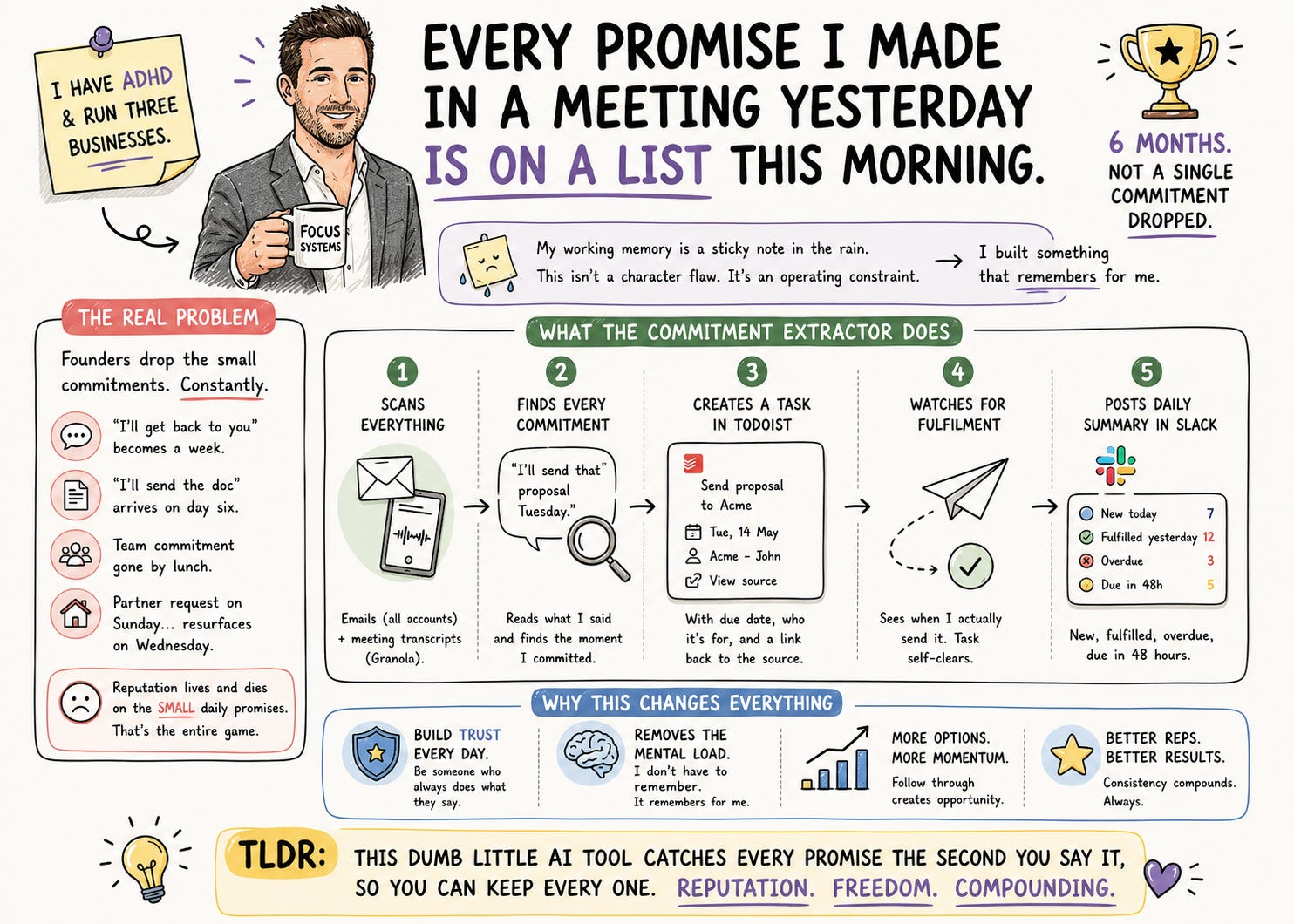
I make about a hundred promises a week.
“I’ll send you the proposal Tuesday.” “I’ll loop Sarah in.” “I’ll get those numbers across this arvo.” “I’ll get back to you on the offer by EOW.” “I’ll, yeah, definitely have a look at it tonight.”
For most of my career I would forget about ninety of them within twenty minutes.
I have ADHD. I have kids. I have a partner. I surf, I read, I work on myself, I show up to a bunch of things that matter. My working memory has the storage capacity of a sticky note that’s been left out in the rain.
This wasn’t a character flaw. It was an operating constraint. Smart enough to land things in the room. Distracted enough to drop them by the time I was in the lift.
For the last six months I haven’t dropped a single commitment.
Not because I got better at remembering. Because I built something that remembers for me.
This is the smallest, dumbest, least sexy AI thing I’ve made. It’s the one I’d keep if I had to give up everything else.
The thing nobody admits about being a founder
Every founder I know is dropping commitments. Quietly. Constantly.
Not the big ones. The small ones.
The “I’ll get back to you” that becomes a week of silence. The “I’ll send the doc” that arrives on day six. The standup commitment to your team that’s gone from your head by lunch. The thing your partner asked you to do on Sunday that resurfaces on Wednesday with a look that says we have spoken about this.
Your reputation isn’t built on the big strategic promises you keep. It’s built on the small daily ones. The “I’ll do it by Thursday” that arrives Thursday is the entire game. It separates you from almost everyone else they deal with.
Most founders I know cope by doing one of two things. Either they over-commit in the moment and quietly under-deliver. Or they under-commit and seem unhelpful. Both look bad. Both feel bad.
The fix isn’t willpower. I tried willpower for fifteen years. The fix is a system that catches everything you said the second you said it.
What the Commitment Extractor does
I don’t open this thing. I don’t think about it. It runs in the background every evening, while I’m cooking or with the kids or scrolling something I shouldn’t be scrolling.
Here’s what it does:
Scans every sent email from the last 24 hours. All my accounts.
Scans every meeting transcript from the last 24 hours. Granola, mostly. This is the bit that changed my life. More on it below.
Reads everything I said, looking for the moment I committed to something.
Creates a task in Todoist with the commitment, the due date, who I made it to, and a link back to where I said it.
Watches my outbound activity the next day for fulfilment. When I actually send the thing on Wednesday, the task self-clears. I don’t have to mark anything off.
Posts a daily summary in Slack. New today, fulfilled yesterday, overdue, due in the next 48 hours.
Step three is where the AI earns its keep, and it’s worth slowing down on for a second.
A regex could catch “I will send the proposal by Thursday.” That’s not the problem. The problem is the way real people actually commit to things, which is almost never that clean.
It’s “leave it with me.” It’s “yeah, I’ll get that across.” It’s “let me check with finance and circle back.” It’s “I’ll have a think and come back to you.” It’s the throwaway “I’ll send through that link” mentioned in passing while you’re already onto the next agenda item. It’s “remind me to do that next week” said as a request that’s actually a commitment. It’s the soft “I’ll see what I can do” that the other person heard as a yes.
The AI reads intent, not keywords. It picks up the verb of delivery (send, share, book, prep, check, confirm, revert, sort, get across), it figures out who you committed to, and it works out a due date from context. “By Thursday” means next Thursday. “EOW” means Friday. “This arvo” means today. “Soon” means three business days unless you’ve said otherwise. No reference at all means it gives you two business days as a default and you can argue with it later.
It also catches the ones I would never catch myself. The line buried halfway down an email reply that I wrote in 90 seconds between meetings. The “yeah for sure” I muttered in a Granola call while looking at something else on my second screen. The aside in a standup where someone said “could you check that?” and I said “yep” and we moved on. All of them get caught.
I wake up to a list of things I promised, ordered by when I said I’d deliver. I go to bed knowing nothing slipped.
The bit that changed everything
Email commitments are easy to catch. They’re written down. Anyone with eyes can find them again.
Meeting commitments are vapour.
I’ll say something at 9:04am in a standup, and by 9:04pm I have no memory of having said it. The other person remembers. They’re waiting on Wednesday. I forget by Tuesday. They mention it three weeks later with a tight smile and a “did you have a chance to...” and I die a small internal death.
I use Granola for meetings. It transcribes everything automatically, so the words I forgot saying are still sitting there, in writing, with timestamps. The Commitment Extractor scans those transcripts too. Client calls. Team standups. Board meetings. The spontaneous Zoom that wasn’t on the calendar. The one where someone asked me a casual question and I said “yeah I’ll send that over” while my brain was three meetings ahead.
All of it. Caught.
This single addition moved me from “above average for a founder” to “people commenting on it.” A client said to me recently, “Jono, you’re the only one who actually does what he says he will.” That’s a sentence I would have laughed at, six months ago.
It’s not because I changed. It’s because the system has my back.
What changes the first week you have this
A few things shift, and one of them is bigger than I expected.
You stop trying to remember. You can be present in meetings, with your team, with your kids, because your brain isn’t holding a running list of every loose end. You can have a coffee without your jaw clenching every time you think of something you forgot to do.
You start over-delivering on tiny things. The doc you said you’d send by EOD arrives at 11:47am. Nobody says anything. But you go up a rung in their head. Every time. The compounding here is real.
Your commitments get sharper. This one took me by surprise. Once you know everything you say will become a tracked task, you stop saying vague things. “I’ll send some info” becomes “I’ll send the case study by Thursday morning.” You stop hedging because you don’t need to. The system trains you to commit better.
But here’s the thing nobody told me when I started.
I now walk into meetings differently.
I make clear, definitive promises. No “I’ll try.” No “let me see what I can do.” No “I’ll get to it when I can.” Just “Yes, Thursday morning.” “Yes, by EOW.” “Yes, I’ll book it.” Said with confidence, because I know the system has it the moment it leaves my mouth.
That feeling, of knowing you will deliver on your word, every single time, without ever having to remember any of it, is the closest thing I have to a superpower.
I still forget what I had for breakfast. I just don’t forget what I promised you.
How to install it
This one’s different from the previous two posts. It’s not a skill. It’s a scheduled task. It lives in Claude Cowork, which is the desktop app, not the browser.
What you need
A paid Claude plan. Pro ($20/month) or higher. Scheduled tasks aren’t on Free.
Claude Desktop installed. Download it from claude.ai if you don’t already have it.
Email connected (Gmail, Outlook, Microsoft 365).
A task manager connected. Todoist, Asana, Linear, Notion, ClickUp, Apple Reminders. Whichever one you actually open.
A meeting notes tool connected, ideally Granola. This is what unlocks the meetings feature. Optional but I cannot recommend it enough.
A team chat connected (Slack, Teams, Discord) for the daily summary. Optional. You can have the summary emailed to yourself instead.
The five-minute setup
1. Open Claude Desktop. Click your name, then Settings, then Connectors. Connect each tool from the list above.
2. Click the Cowork tab at the top of the desktop app. This is where scheduled tasks live. If you’ve never used Cowork before, this is the moment.
3. Create the task. Two ways:
The fast way. In any Cowork conversation, type /schedule. Claude will ask what you want it to do. Paste the prompt from the bottom of this post.
The manual way. Click “Scheduled” in the left sidebar, then “+ New task”. Paste the prompt into the task body. Give it a name, something like commitment-extractor.
4. Edit the CONFIGURE lines (there are three this time, because of meetings). I’ll walk you through them in the next section.
5. Pick a schedule. Two recommendations.
One run, end of day, around 6pm. Catches everything from today before you log off. This is what I’d start with.
Two runs, midday and EOD. Noon and 6pm. For founders making a lot of commitments per day who want the midday catch before the morning ones get cold.
6. Save and turn on.
The three lines to edit before you save
When you paste the prompt you’ll see three lines marked [CONFIGURE]. Edit these first.
Line 1, your email accounts. If you have one, leave it. If you have multiple, list them all. Mine catches both my businesses.
Line 2, your meeting tool and your name in it. Tell it which meeting notes tool to scan (Granola, Otter, Fathom, etc.) and what name you go by in the transcripts so it knows which speaker is you. Mine looks like:
Scan meeting transcripts from Granola for the last 24 hours. My name in meeting transcripts is “Jonathan Horne” (also appears as “Jono” or “JH”).
If you don’t have a meeting tool connected, leave this blank. The skill will just scan emails.
Line 3, where the summary goes. Default is Slack. Change to whatever channel or inbox you’ll actually see in the morning.
Everything else stays as-is.
The thing nobody warns you about
Cowork scheduled tasks run locally on your machine, while Claude Desktop is open.
If your laptop is closed at 6pm, the task doesn’t fire.
Three options.
Run it during work hours. 6pm EOD assumes you’re still at your desk. Most of us are. If you’ve already packed up by 5, set it to 4:30.
Toggle “Keep awake” on. There’s a switch in the Scheduled sidebar that stops your machine sleeping through overnight runs. Works for desktops and plugged-in laptops with the lid open.
Use Claude Code Routines if you need it truly hands-off. These run in the cloud, your machine doesn’t need to be on. More setup, more developer-flavoured, but if you live and die by overnight automation it’s worth it. Out of scope for this post.
For most people, EOD at 6pm solves the whole problem.
Three things I’d tell another founder running this
1. Don’t read the whole list every morning. Just look at new commitments. The old ones are tracked. The point of the system is to remove cognitive load, not add a daily ritual. I check mine for about 90 seconds with my first coffee.
2. Don’t argue with it. When the system catches a commitment you don’t remember making, you made it. Go look at the email or the transcript. You said it. You forgot. That’s exactly why you needed this. Arguing with the system is arguing with yourself from six hours ago.
3. After a week, look at the pattern, not the list. Which people do you over-commit to? Which days of the week do you make the most promises? What’s your fulfilment rate, week over week? This is where the real coaching lives. It tells you who you’re trying too hard for and where your follow-through quietly breaks. I added a weekly digest run for exactly this. It’s at the bottom of this post.
That third one is where the tool stops being a productivity hack and starts being a mirror.
The compounding
Week one, this saves you from missing one or two things.
Week four, your team has noticed. Your partner has noticed. Your clients have noticed. Nobody says anything specific. But you can feel the room rearranging slightly around you. People stop double-checking that you’ll do what you said. They just expect it. Because you do.
Month three, this is your reputation.
You’re the founder who keeps his word. Without effort, without strain, without remembering anything. The system has your back, so you have everyone else’s.
If you only ever build one AI thing, build this one.
Get the prompt
The scheduled task prompt is below.
Copy it. Paste it into Cowork via /schedule. Edit the three CONFIGURE lines. Turn it on.
Tomorrow morning you’ll wake up to a list of things you’d already forgotten you’d promised. Some of them you won’t even remember saying.
Reply to this post and tell me what you found. I read every reply.
The scheduled task prompt
Paste everything in the block below when you create the scheduled task. Edit the three [CONFIGURE] lines first.
You are the Commitment Extractor. You run on a schedule. Your job is to make sure no promise the user made yesterday slips through the cracks.

This task runs in Claude Cowork on the user's local machine. The user's Claude Desktop must be open at the scheduled time.

## CONFIGURATION

[CONFIGURE: EMAIL ACCOUNTS]
Scan sent emails from the following account(s) from the last 24 hours:
- primary@example.com
(add additional accounts if you have multiple — one per line)

[CONFIGURE: MEETING SOURCES + YOUR IDENTITY]
Scan meeting transcripts from the last 24 hours from:
- Granola (recommended)
- (or Otter, Fathom, Fireflies — whichever you use)
- Leave blank if you don't want to scan meetings

Your name as it appears in meeting transcripts (so the system knows which speaker is you):
- Your full name (e.g., "Jonathan Horne")
- Any aliases (e.g., "Jono", "JH")

[CONFIGURE: SUMMARY DESTINATION]
Post the daily summary to:
- Slack channel: #my-followups
(or replace with Teams channel, Discord channel, or email-to-self — whichever you'll see in the morning)

[CONFIGURE: TASK MANAGER]
Create tasks in whichever task manager the user has connected:
- Todoist, Asana, Linear, Notion, ClickUp, Apple Reminders, or similar
- If multiple are connected, prefer the one explicitly named here. Otherwise use the first one available.

## STEP 1 — GATHER SOURCE MATERIAL

### 1a. Scan sent emails
For each configured email account, fetch all emails sent in the last 24 hours. For each email, extract:
- Recipient(s)
- Subject
- Send date/time
- Full body
- Thread ID
- Direct link to the email

If no email connector is available, abort and post a one-line message to the summary destination: "Commitment Extractor: no email connector available, please reconnect."

### 1b. Scan meeting transcripts (if a meeting tool is configured)
Fetch all meeting transcripts from the last 24 hours from the configured meeting tool. For each meeting, extract:
- Meeting title
- Date/time
- Participants
- Full transcript with speaker labels
- Direct link to the meeting

If no meeting tool is configured or none is connected, skip this step silently. Do not fail the task.

## STEP 2 — IDENTIFY THE USER'S CONTRIBUTIONS

For emails: every sent email is by definition something the user said. Use the full email body.

For meeting transcripts: identify which speaker lines belong to the user. Match the name(s) listed in [CONFIGURE: MEETING SOURCES + YOUR IDENTITY] against the speaker labels in each transcript. Only extract commitments from lines spoken by the user. Other participants' statements (including their commitments to the user) are ignored for this step.

If the speaker labels are ambiguous (e.g. "Speaker 1", "Speaker 2"), infer who the user is from the meeting context — typically the host or the most active participant, or by matching content to their writing style from emails. If still ambiguous, skip that meeting and note it in the summary.

## STEP 3 — EXTRACT COMMITMENTS

For each email and each meeting, identify any commitments the user made. A commitment is any statement where the user promises to do, send, share, send through, follow up on, check, confirm, schedule, prepare, book, revert, or otherwise deliver something to someone by some implied or explicit time.

Examples to capture:
- "I'll send you the proposal by Thursday"
- "I'll loop in Sarah this week"
- "Let me check with finance and revert by EOW"
- "I'll book a time on your calendar tomorrow"
- "Yeah, I'll get that over to you"
- "I'll have a draft ready Monday"
- "I'll grab those numbers and send them through"

Ignore:
- Statements about what someone else will do
- Conditional commitments where the condition isn't met ("if X happens, I'll Y")
- Reaffirmations of commitments already made earlier in the same thread or meeting
- Polite filler ("happy to help", "let me know", "sounds good")

For each commitment, extract:
- **Commitment text** — the exact words used (or close paraphrase)
- **Recipient** — who the user committed this to
- **Source** — "email" or "meeting"
- **Due date** — explicit if stated, otherwise inferred from context:
  - "by Thursday" → next Thursday
  - "this week" → end of current week (Friday EOD)
  - "EOW" → end of current week
  - "tomorrow" → next business day
  - "next week" → end of next week (Friday EOD)
  - "soon" / "shortly" / "in a few days" → +3 business days
  - No time reference at all → +2 business days as default
- **Source link** — direct link to the email or meeting where the commitment was made

## STEP 4 — DEDUPLICATE AGAINST EXISTING TASKS

Before creating new tasks, fetch the user's open tasks from their task manager. For each new commitment, check if a task with similar text, recipient, and due date already exists. If a duplicate is found, skip creating a new task.

Also deduplicate within today's run: if the same commitment appears in both an email and a meeting (e.g. user confirmed it verbally and then in writing), create one task and reference both sources.

## STEP 5 — CREATE TASKS

For each new (non-duplicate) commitment, create a task in the task manager with:

- **Title**: A short, action-oriented version of the commitment
  - Bad: "Will send the proposal to Sarah by Thursday"
  - Good: "Send proposal to Sarah"
- **Description**: The full commitment text + recipient + source (email/meeting) + direct link
- **Due date**: From Step 3
- **Tag/Label**: "commitment"
- **Priority**: Normal (high only if the language signals urgency — "urgently", "ASAP", "today")

If no task manager is connected, skip task creation and post the new commitments directly in the summary in Step 7, with a note flagging the missing connector.

## STEP 6 — DETECT FULFILLED COMMITMENTS

For each commitment task currently open (created on any previous day):

1. Look at the user's sent emails from the last 24 hours
2. Determine if any of them fulfill the commitment:
   - "Send proposal to Sarah" → was a proposal-related email sent to Sarah?
   - "Loop in James" → was James added to a thread or emailed?
   - "Share the case study" → was a case study attached or linked?
3. If a fulfillment is detected, mark the task complete and capture the fulfillment email link

Be reasonably generous. Partial fulfillment counts. If the user sent something to the right person on the right topic within a reasonable window, mark it done. False negatives (missing real fulfillments) create overdue noise and erode trust in the system.

## STEP 7 — IDENTIFY OVERDUE COMMITMENTS

List all commitment tasks where:
- Due date is in the past
- Task is still open
- No matching fulfillment has been detected

## STEP 8 — POST THE DAILY SUMMARY

Send a summary to the configured destination in this format:

---

**Commitments — [today's date]**

**New today** ([count]):
- [commitment] → due [date] (to [recipient]) [📧 email link or 🎙️ meeting link]
(list every new commitment captured today, with an emoji or label showing the source)

**Fulfilled today** ([count]):
- [commitment] (was due [date]) — delivered [link]

**Overdue** ([count]):
- [commitment] (was due [date], to [recipient]) [link]

**Due in next 48 hours** ([count]):
- [commitment] → due [date] (to [recipient]) [link]

---

Keep the summary scannable. Bullets, not paragraphs. No commentary.

If the summary destination is unavailable, fall back to sending the summary to the user's primary email account (send-to-self).

## OPERATING RULES

- Be conservative on creating tasks. False positives erode trust. Skip ambiguous statements.
- Be liberal on detecting fulfillment. False negatives waste the user's time.
- For meeting commitments, be extra cautious about attributing statements to the right speaker. When in doubt, skip.
- Never modify or delete existing tasks not created by this task. Only mark commitment tasks (tagged "commitment") as complete.
- Run silently. Do not message the user during the day. The daily summary is the only output.
Two upgrades worth knowing about
These aren’t necessary. They’re what other founders ask me about after a couple of weeks.
The weekly digest. Create a second scheduled task that runs every Friday at 5pm. Same prompt structure, but instead of “last 24 hours” it looks at “last 7 days” and produces a pattern view: fulfilment rate, top three people you over-commit to, top three days you make the most promises, top three commitment types you actually miss. This is where the self-coaching lives. Read it on Saturday morning. You will see something about yourself.
Tighter commitment detection. If the first week catches too much noise, add this line above Step 3 in the prompt: “Only capture commitments with an explicit verb of delivery — send, share, book, prepare, check, confirm, revert, schedule. Ignore softer phrases like ‘I’ll think about it’, ‘happy to’, or ‘let me see what I can do’.” Tightens the net considerably.
That’s it. Set it up tonight. Tomorrow morning the list will already have you on the back foot. It’s the best back foot I’ve ever been on.